Set up your new Mac using this quick guide. The full setup process takes approximately one hour.
If you have not yet enabled multi-factor authentication (MFA) for your account, install the Microsoft Authenticator app from the Apple App Store or Google Play Store, and follow these instructions: https://ict.oulu.fi/16893/
- Turn on your computer and make sure the charger is connected. When you start setting up your computer, do not restart the device until the setup process is complete. If you are prompted to transfer data from another computer, select “Set up as new” to avoid potential system conflicts.
- Choose your preferred language and keyboard settings, and connect the computer to a network. In general, the setup can be completed using any network. However, when on campus, we recommend using the public Panoulu network.
- Click the “Enrol” button and sign in with your University of Oulu or Oamk user account. (username@univ.yo.oulu.fi or username@oamk.fi).
- At the Single Sign-On for Mac stage, sign in using your University of Oulu or Oamk user account (username@univ.yo.oulu.fi or username@oamk.fi). If you receive an “Unable to Sign-In” error message, wait approximately 5 minutes and then select “Try Again.” If the sign-in window does not appear at this stage, you can complete the sign-in later from the enrollment notification that appears on your desktop.
- Create a password for your computer user account. NOTE: Wait approximately 15–20 minutes before proceeding at this stage to allow all required settings to be applied in the background. After that, create your password. We recommend using the same password as for your University of Oulu or Oamk user account.
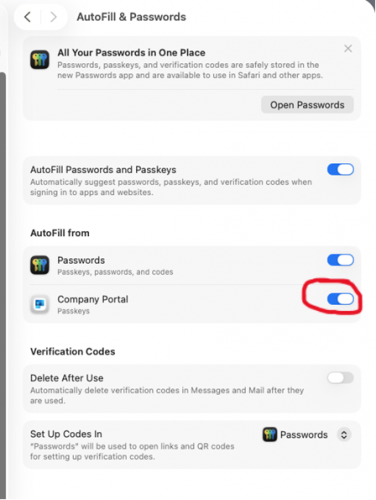
- When the desktop opens, go to System Settings → General → Autofill & Passwords, and enable Company Portal under the “AutoFill from” setting.
- Lastly, restart your computer after the installation is complete.
« Back
This article was published in categories English version available, All instructions, Oamk , for Oamk staff, for the University of Oulu staff, Saavutettava ohjeartikkeli, UniOulu and tags computer, kannettava, käyttöönotto, laptop, mac, macOS, setup, tietokone. Add the permalink to your favourites.