File classification is currently available only to ICT Services staff. It will be rolled out to all staff in Oulu higher education institutions during 2026. We follow the national data classification model used by higher education institutions in Finland.
The data classification pilot has started within ICT Services. During the pilot, your files may be classified automatically if you share them in Microsoft 365 with an ICT Services employee.
Where to find sensitivity labels
The sensitivity labeling tool is available in:
- Word
- Excel
- PowerPoint
- Outlook
Sensitivity labels are available in both desktop applications and Microsoft 365 web apps (via a browser).
We use the following sensitivity labels:
- Private
- Open (5W)
- Internal (4G)
- Confidential (3Y)
- Strictly confidential (2A)
- Secret (1R)
Each label also includes sub-labels. You can find detailed descriptions of all labels directly in the Office applications. See also The National Data Classification for Finnish Universities for more.
The default sensitivity label for files is Confidential (3Y)
When you create a new file or open an existing file that has not yet been labeled, Microsoft 365 automatically applies the default label Confidential (3Y).
If this label does not match the content of the file, change the label to the appropriate level.
Applying a sensitivity label to a file
You can apply or change a sensitivity label in three different places:
- On the Home tab, select Sensitivity (stamp icon) to see the available labels.
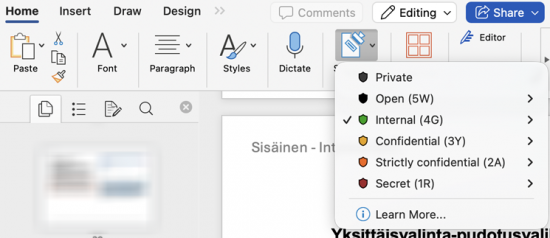
- When saving a file, you can select the sensitivity label from the drop-down menu in the Save view, located below the file name and storage location.
- The sensitivity label is also visible at the top of the application window, to the right of the file name.
Applying a sensitivity label to email
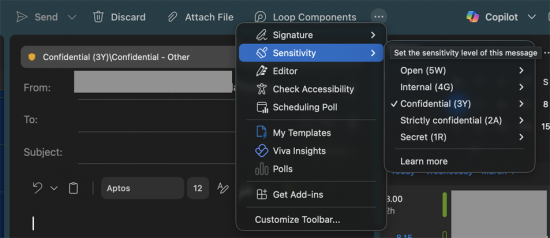
In Outlook, the sensitivity label is available on the message toolbar.
If not all options are visible, select the three dots menu (See more items) and choose Sensitivity from there.
What happens when a sensitivity label is applied
Sensitivity labels automatically apply protection policies, which control how files and emails can be shared in Microsoft 365. Depending on the label, sharing a file outside the organization may be allowed or blocked, and even encrypted.
Please note:
- Protection settings may take a short delay after saving to take effect.
- The sensitivity label remains with the file, including any downloaded copies.
Changing a sensitivity label
You can change the sensitivity label of a file at any time.
For emails:
- The sensitivity label cannot be changed after the message has been sent.
- Existing (older) emails cannot be labeled at all in Outlook.
💡 Good to know
- Sensitivity labels do not affect the content of the file.
- They only affect how the file is handled and shared.
- Responsibility for choosing the correct sensitivity label lies with the content creator and anyone who edits the file.
- When you create or modify files, it is your responsibility to ensure they are classified correctly based on their content.