When external participants have access to a Team, file sensitivity labels (classification) determines which files they can access.
Rule of thumb
Label the Team according to who needs to work in it.
Label files according to the data they contain.
Why should you pay attention to Team sensitivity label?
Microsoft Teams is widely used in research projects involving not only staff from your own institution but also participants from other universities, research institutes, companies, and other organisations. The Team sensitivity label should be selected when the Team is created, based on who needs to work in the Team and what type of data will be handled.
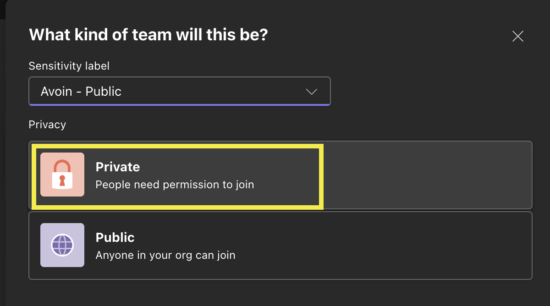
When you create a Team, you also define its privacy setting. An Avoin – Public Team can be either Public or Private. Teams in all other team labels are always Private.
Any user of the University of Oulu or Oamk, including students, can join an Avoin – Public Team whose privacy setting is Public. If you want to control membership, choose the Private setting. Note that external partners can be added not only to Avoin – Public Teams but also to Sisäinen – Internal and Luottamuksellinen, ulkoinen – Confidential External Teams.
Team sensitivity label and file sensitivity label are different things
A Team sensitivity label determines, among other things, whether external users can be added to the Team.
A file sensitivity label determines the restrictions related to accessing, processing, and sharing that file.
The sensitivity label of a Team does not automatically determine the sensitivity label of files stored within it. The default sensitivity label for a new file is always Confidential (3Y). Files with different sensitivity labels can coexist in the same Team.
External participants in Teams with different sensitivity labels
| Team sensitivity label | External members allowed? | Meaning in research collaboration |
|---|---|---|
| Avoin – Public | Yes | Suitable for open collaboration. The Avoin – Public Team can be configured as either Public or Private.
Any University of Oulu or Oamk user can join a public Avoin – Public Team. In a private Avoin – Public Team, the Team owner adds members or approves join requests. The Team owner can invite external collaborators as guest users to both public and private Avoin Public Teams. |
| Sisäinen – Internal | Yes | Consider carefully whether this label is appropriate for external research collaboration.
External collaborators can still be invited as guest users. |
| Luottamuksellinen, ulkoinen – Confidential External | Yes | Intended for confidential collaboration involving external participants. External collaborators can be invited as guest users. |
| Luottamuksellinen, sisäinen – Confidential Internal | No | Intended only for users within the organisation. External members cannot be added. |
| Salainen – Restricted | No | Intended only for users within the organisation. External members cannot be added. |
Practical rule: If a research project requires external partners to be regular Team members, do not choose a Team sensitivity label that prevents external membership.
How can external users access files in a Team?
When an external user is a Team member, access to files is determined by the file sensitivity label and any Team-level restrictions. Always label files according to their content, intended use, and associated risks.
External Team members can access files labeled as:
- 5W Open: No sharing restrictions. Anonymous links cannot be created from Teams, but the file can be shared externally by other means.
- 3Y Confidential: Anonymous links are blocked across Microsoft 365.
- 2A Confidential, Restricted: Copilot processing and anonymous links are blocked across Microsoft 365.
The following files are not available to external users and do not appear in file listings:
- 4G Internal: External sharing and anonymous links are blocked.
- 1R Secret: External sharing and anonymous links are blocked.
- Note that when you change a file’s label, the associated protection controls may not take effect immediately. During this delay, external users may temporarily be able to access a file before the restrictions are fully applied. The delay may last several minutes.
You cannot share files from 1R or 2A Teams with users outside the organisation. In other Team sensitivity labels, sharing is determined by the file's own label. Therefore, always verify both the Team sensitivity label and the file sensitivity label before starting external collaboration.
Example: Research project with an industry partner
A research project involves researchers from your organisation and three specialists from a company. The specialists are added as guest users and sign in with accounts from their own organisation.
The Team sensitivity label is Confidential External, which allows external members.
Files shared within the Team are labeled according to their content: General project material is labeled as 3Y Confidential. Material intended for publication is labeled as 5W Open. Material that must be excluded from Copilot processing is labeled as 2A Confidential, Restricted. Particularly sensitive material is labeled as 1R Secret, which external users cannot access.
Changing the Team sensitivity label to Confidential Internal or Restricted prevents external membership.
If external participants need access to 1R information, they must be provided with UFO accounts.
Checklist for researchers creating a Team
The Team sensitivity label primarily determines who can be added to the Team and what type of collaboration the Team supports. Protection of the actual data is provided through file label and permissions. Therefore, choose the Team label according to collaboration needs, while file label determines who can access, share, or use the data.
- Make sure your Team is not open to the entire organisation unless that is your intention.
Even if the Team uses the Avoin – Public label, you can control membership by choosing the Private privacy setting. - What type of research data is likely to be stored in the Team?
Consider during Team creation what types of data will be handled and who requires access to them. - Will people from outside your organisation participate?
If so, ensure that the chosen Team sensitivity label allows external users. In practice, Luottamuksellinen, ulkoinen – Confidential External and Avoin – Public (Private) Teams are suitable for external collaboration. - Do external users need access to Team files?
Remember that external users cannot access 4G or 1R files, even if they are Team members.- If the collaboration involves open materials (5W): Choose an Avoin – Public Team and, typically use the Private privacy setting.
- If the collaboration involves confidential (3Y) or restricted confidential (2A) materials: Choose a Luottamuksellinen, ulkoinen – Confidential External Team.
- If the collaboration involves restricted (1R) information: Choose a Salainen – Restricted Team. External participants must be provided with UFO accounts in order to join the Team and access 1R-classified information.
- Could the Team later contain protected data?
- Examples include draft research results, NDA-protected materials, company-provided datasets, patent-related documents, and special categories of personal data. If such data may be introduced later, consider selecting a sufficiently protective Team sensitivity label from the beginning. Remember, however, that files must always be labeled according to their actual content.
Do not accept the default Team sensitivity label as is. Select the label that best matches the intended use.
You can also change the label of a Team that you own later if external participants need to be added.