If you wish, you can share your calendar through Outlook for other people to see, either per person or through a link that anyone can access.
This is done through the Outlook desktop app or the web app. You can access the web app from https://outlook.office.com/mail/.
- Open the Settings menu by clicking on the cogwheel icon in the top right.
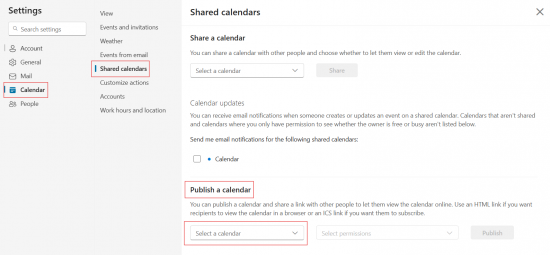
- In the Settings menu, select Calendar.
- After that, select Shared calendars.
- In the Publish a calendar field, select the calendar you wish to share and the permissions (read/write).
- In the Share a calendar field, you can share your calendar by person, instead of a link.
- Finally, click Share.
- Copy the link and send it forward.
- If you wish to remove the link, select Not Shared as the calendars permissions state and save.